

For business, apps & marketplaces

AI Image Enhancement API

Automatically enhance, upscale, denoise and process images at scale with one API. Combine multiple enhancements in a single request and pay one credit per processed image.

  • Multiple enhancements. One API request. One credit.
  • Built for automated, high-volume processing.
  • 10 free credits to start. Need more for testing? Email support@deep-image.ai.
View API documentation
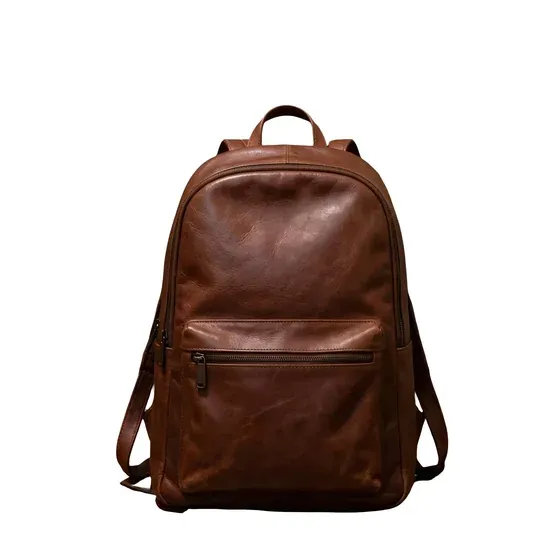
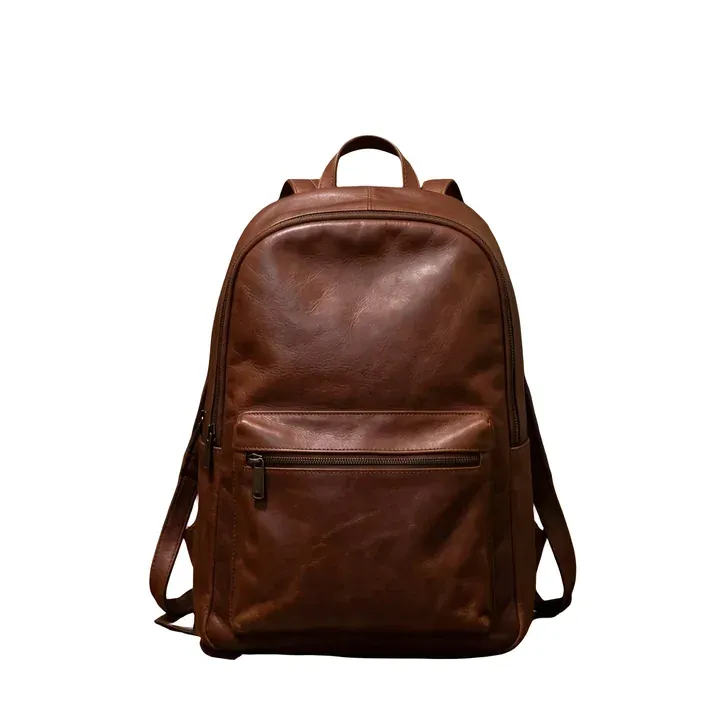
BeforeAfterDim, noisy phone photo of a brown leather backpack in a cluttered hallwayThe same backpack on a clean white background, brighter, sharper and upscaled by the API
Real API result · one request= 1 credit
  • Background removal
  • Light & color correction
  • Denoise & deblur
  • Upscale 3.2×
Experience

since2019

Building image enhancement models.

Free to test

10credits

To try the API. More on request.

Your data

NoAI training

We don't use your images to train AI models.

Pricing

1credit

For a whole enhancement workflow in one request.

What you can automate

Real API results. Each one came from a single request that cost one credit.

BeforeAfterPhone photo of a green mug on a kitchen counter in warm evening lightThe same mug cut out on a white background, cleaner and upscaled

E-commerce & product photography

Supplier and seller photos arrive dark, noisy and on random backgrounds. Shops and marketplaces need consistent, clean product images before a listing goes live.

  • Background removal
  • Lighting correction
  • Denoise & deblur
  • Upscale
BeforeAfterDark, grainy listing photo of a used wooden armchairThe same armchair photo, brighter and upscaled by the API

Marketplaces & SaaS platforms

User uploads vary in light, noise and resolution. Enhance every upload automatically inside your platform or mobile app, so listings look trustworthy without manual work.

  • Light & white balance
  • Color correction
  • Denoise & deblur
  • Upscale
BeforeAfterClose-up of a small watercolor lighthouse print file, soft and pixelatedThe same close-up after a 4× API upscale, with crisp edges

Print & print-on-demand

Customers upload small files for posters, canvases and merch. Upscale them before printing so details stay sharp at large formats.

  • Upscale 4×
  • Denoise
  • Deblur
BeforeAfterFlat, grey photo of a small Scandinavian living roomThe same living room, brighter with natural colors after the API

Real estate & property listings

Interiors shot on cloudy days look flat and grey. Fix light, color and noise across every listing photo automatically before it is published.

  • Light correction
  • Color & white balance
  • Denoise
  • Upscale

One API. Multiple enhancements. One credit.

Chain the operations a production image needs in a single request instead of paying separately for every step.

  1. Input
  2. Background removal
  3. Color correction
  4. Denoise
  5. Upscale
  6. Output
Input: dim phone photo of a backpack in a hallway
Input
1creditfrom $0.04 / €0.04
Output: centered product photo of the backpack on white
Output
  • Product photos

    • Background removal
    • light & color
    • denoise
    • upscale
  • Marketplace listings

    • Light & white balance
    • color
    • denoise
    • deblur
  • Print & POD

    • Upscale 4×
    • denoise
    • deblur
  • User uploads

    • Denoise
    • deblur
    • light & color
    • resize

One credit covers all standard enhancements in one request. Selected advanced generation models (e.g. ChatGPT Image) use more credits. How requests work

See the API in action

One request: background removal, light and color correction, denoise, deblur and upscale. Copy it, set DEEP_IMAGE_API_KEY and run it.

curl -s https://deep-image.ai/rest_api/process_result \
  -H "x-api-key: $DEEP_IMAGE_API_KEY" \
  -H "Content-Type: application/json" \
  -d '{
    "url": "https://deep-image.ai/api-example2.jpg",
    "enhancements": ["denoise", "deblur", "light", "color"],
    "background": {"remove": "auto", "color": "#ffffff"},
    "width": 2048,
    "output_format": "jpg"
  }'
import os

import requests

response = requests.post(
    "https://deep-image.ai/rest_api/process_result",
    headers={"x-api-key": os.environ["DEEP_IMAGE_API_KEY"]},
    json={
        "url": "https://deep-image.ai/api-example2.jpg",
        "enhancements": ["denoise", "deblur", "light", "color"],
        "background": {"remove": "auto", "color": "#ffffff"},
        "width": 2048,
        "output_format": "jpg",
    },
)
response.raise_for_status()
job = response.json()

if job["status"] == "complete":
    with open("result.jpg", "wb") as out:
        out.write(requests.get(job["result_url"]).content)
else:
    print("Still processing, poll GET /rest_api/result/" + job["job"])
import { writeFile } from "node:fs/promises";

const response = await fetch("https://deep-image.ai/rest_api/process_result", {
  method: "POST",
  headers: {
    "x-api-key": process.env.DEEP_IMAGE_API_KEY,
    "Content-Type": "application/json",
  },
  body: JSON.stringify({
    url: "https://deep-image.ai/api-example2.jpg",
    enhancements: ["denoise", "deblur", "light", "color"],
    background: { remove: "auto", color: "#ffffff" },
    width: 2048,
    output_format: "jpg",
  }),
});
if (!response.ok) throw new Error(`${response.status} ${await response.text()}`);
const job = await response.json();

if (job.status === "complete") {
  const result = await fetch(job.result_url);
  await writeFile("result.jpg", Buffer.from(await result.arrayBuffer()));
} else {
  console.log(`Still processing, poll GET /rest_api/result/${job.job}`);
}

Response

{
  "status": "complete",
  "job": "6f1c2e8a-d1f3-11f1-8e0f-56ae269f9aee",
  "result_url": "https://…/result.jpg"
}

Async and webhooks

/rest_api/process_result returns the result when it's ready in time; otherwise poll GET /rest_api/result/<job>. For batches, send jobs to /rest_api/process and get a callback when each one completes:

"webhooks": {
  "complete": "https://your-app.example.com/deep-image-webhook"
}
Explore full API documentation

Predictable pricing for image processing at scale

From $0.04 / €0.04 per image

One credit covers all standard enhancements in one request. Selected advanced generation models (e.g. ChatGPT Image) use more credits.

Example: 10,000 images × $0.04 = $400. For larger volumes we price individually.

See full pricing

High-volume & enterprise API solutions

Processing a large catalog or building image features into your platform? We'll tailor the offer.

  • Volume-based pricing
  • Integration support and a test on your sample images
  • Individual commercial terms
  • We can build the workflow for you
Get a custom API quote

Built for production

We don't use your images to train AI models.

Sync or async

Get the result in the response for quick jobs, or submit, poll the job status and download when it's ready.

API methods

Webhooks

Receive a callback when a job completes, instead of polling — built for batch pipelines.

Webhooks

Common formats

JPEG, PNG, TIFF, RAW (NEF, CR2) and many more formats in; JPEG, PNG or WEBP out.

Supported formats

API key from the dashboard

Create an account and copy your key from the panel. No sales call needed to start.

Get your key

Large file sets

Process whole catalogs and folders, including connected cloud storage.

Large file sets

Technical support

Get help from our team when you integrate the API or tune a workflow.

support@deep-image.ai

Explore supported models

Deep-Image.ai enhancement models

  • UpscaleDeep-Image.ai super-resolution that keeps detail while increasing size.
  • Light & colorAutomatic exposure, color and white balance correction.
  • DenoiseRemoves grain, low-light noise and compression artifacts.
  • DeblurRestores sharpness in soft and slightly blurred photos.
  • Remove backgroundClean cutouts for products, portraits and catalogs.

Generation models

  • Nano Banana PROGemini 3 Pro Image — top quality for generation, editing and generative upscale.
  • Qwen Image 2.0Precise edits and strong text rendering.
  • SeeDream 4.5Consistent style, strong for portraits and avatars.
  • Gemini FlashGemini 3.1 Flash Image — fast generation.
  • Wan 2.7Versatile generation, editing and uncrop.

More capabilities

Get volume pricing

Tell us about your images and we'll prepare an offer, help with the integration and test the workflow on your samples. No account needed.

Prefer a call? Book a meeting.

We use these details only to answer your request, as described in our privacy policy.

Frequently asked questions

What is an AI Image Enhancement API?

It is an HTTP API that improves images automatically: it upscales them, removes noise and blur, corrects light and colors and can remove the background. You send an image and the parameters, and get the processed image back — no manual retouching.

What is the difference between an image enhancer API and an image upscaler API?

An upscaler only increases resolution. An enhancer improves the image itself — light, colors, noise, sharpness, background. Deep-Image.ai does both: you can upscale and enhance in the same request.

Can I combine multiple image enhancements in one API request?

Yes. Upscale, denoise, deblur, light and color correction and background removal can be combined in one request, and the processed image costs one credit.

How much does it cost to process an image?

From $0.04 / €0.04 per image. One credit covers all standard enhancements in one request. Selected advanced generation models (e.g. ChatGPT Image) use more credits.

See full pricing

Can I test the API for free?

Yes. Every new account gets 10 free credits to test the API. Need more for testing? Email support@deep-image.ai and we'll add extra test credits.

Can I use the API in my SaaS platform or mobile application?

Yes. It is a REST API, so you call it from your backend — for example when a user uploads a photo in your web or mobile app — and show the processed image in your product. Keep your API key on the server, not in the app.

Do you use my images to train AI models?

No. We don't use your images to train AI models.

What happens if an API processing request fails?

The API answers with an error status and message, or the job's status shows it failed, so your integration can retry it. If something keeps failing, write to support and we'll look into the job.

Do you offer custom API pricing and integration support?

Yes. For high volumes we offer volume-based pricing, help with the integration, a test on your sample images and individual terms. We can also build the workflow for you. Send the quote form on this page.

Ready to automate your image processing?

Start integrating our API today, or talk to us about a custom solution for your business.